
On this page
The short answerHow Edge0 moves model partsWhich Edge0 model is for which device?Real speed tests, with the limits shownOne community test shows why memory mattersA 3 GB memory reading does not mean a 3 GB downloadWhat we can and cannot say about qualityWho should try Edge0?How to try it without wasting storageCommon questionsSourcesEdge0 is a set of AI models and tools that can read model parts from storage as needed. Its 35B model has been tested on phones, but the model files still need a lot of storage. Its 145B model can use a 24 GB graphics card, but also needs much more memory in the rest of the computer.
Here is what matters, why it matters and how to check it on your own setup.
The short answer
Edge0 (said like “Edge Zero”) is a free, open project for running some AI models on your own device. It includes a smaller 35B model for phones and computers, and larger 120B and 145B models for powerful computers.
The B means billion. It is a count of learned number values inside a model. A bigger number does not always mean a better choice. Big models need more storage, memory, and power.
The important point: Edge0 can keep only some model parts in fast memory and read other parts from storage when needed. This can make a large model possible on a smaller device. It does not make the download small, and it does not make every device fast.
Check the exact model folder, free storage, RAM, graphics memory, device, and Edge0 version. A model name alone cannot tell you if it will work well.
How Edge0 moves model parts
Some Edge0 models contain many small teams called experts. For each next piece of text, the model chooses a few experts to help. Edge0 can prepare likely needed parts while the current answer is being made.
Think of the graphics memory as a small desk, the computer’s RAM as a larger table, and the SSD as a big filing cabinet. The filing cabinet holds more, but looking things up takes longer. Edge0 tries to move useful parts to the desk before they are needed.
A plain-language guide to the project’s description. The exact memory use depends on the device, model file, settings, and prompt.

Which Edge0 model is for which device?
The 35B model is the phone and laptop choice. The 120B and 145B models are for computers with a supported graphics card or Apple Silicon Mac. The tools and supported devices are different for each model, so do not assume one setup guide works for all of them.
| Model | Test example from the project | What to remember |
|---|---|---|
| Edge0 35B | iPhone 17 Pro Max: 13.2 tokens per second; Android OnePlus with 16 GB RAM: 11.4–11.8 | Tested phone models differ. The model files need about 18 GB to download and converted files need about 20 GB, plus temporary space. |
| Edge0 120B | RTX 4090 24 GB: 95 tokens per second for chat in the project’s Q3_K test | The 24 GB card is not the only memory used. Its Q3_K model weights are about 28 GiB. |
| Edge0 145B | RTX 4090 24 GB: 69.9 tokens per second for chat in the project’s Q3_K test | The 145B Q3_K weights are about 40.8 GiB. The project’s 24 GB GPU test also used host RAM. |
Tokens per second is a rough speed measure. A token can be a whole short word or only part of a word.
Real speed tests, with the limits shown
The figures below come from Edge0’s own published tests. They are useful clues, not a promise for your computer. The test used named devices, software, model files, and settings. Different hardware or a long prompt can change the result.
For the 35B model, the project tested a 627-token prompt on an iPhone 17 Pro Max and an Android phone. The iPhone produced about 13 tokens each second after the first token. The Android phone produced about 11 to 12. The first answer took about 8 seconds on the iPhone and about 18 seconds on that Android test phone.
12 GB phone · first token about 8.2 sec
16 GB phone · first token about 18.4–18.8 sec
24 GB graphics card · Q3_K chat test
One community test shows why memory matters
A user shared a test of Edge0 145B on a Windows computer with an RTX 4090 graphics card, 64 GB of RAM, and a fast SSD. The user measured about 61 tokens per second for chat. This is one person’s report, not a test of every computer.
That same report showed that changing a memory setting reduced the computer’s reported memory use, but made the first long answer slower. The project team replied with another setup to try. This is useful real-world evidence: settings and prompt length can change both memory use and speed.
The user’s report and the project’s own 69.9-token result are close in the broad sense, but not identical. The devices, settings, and test methods differed. Do not treat them as a guaranteed speed range.
Do not buy a 24 GB graphics card alone because the headline says “145B on one GPU.” Check the full computer’s RAM, the exact model folder, and the current setup notes first.
A 3 GB memory reading does not mean a 3 GB download
In one phone test, the 35B model’s active memory reading was about 3 GB. That is the memory used during that particular test. It does not mean the model fits in 3 GB of phone storage.
Edge0’s setup notes say the original 35B files need about 18 GB, and the converted files need about 20 GB. The conversion step can need about 20 GB of extra free space. Leave room for your phone’s apps, photos, and operating system too.
The 145B model is larger still. Its Q3_K weights alone are about 40.8 GiB. In the project’s RTX 5090 D example, it used about 23.1 GiB of graphics memory and 31.3 GiB of computer RAM while keeping model parts ready. A 24 GB graphics card does not remove the need for system RAM and storage.
| Number | What it means | Example |
|---|---|---|
| Download or folder size | Space to save the model files | Edge0 35B: about 18 GB original files; about 20 GB converted files |
| RAM or graphics memory | Working space used while the model runs | One 35B phone test reported about 2.8–3.1 GiB, depending on device |
| Speed | How quickly the model starts and writes text | One phone may be faster than another even if both can open the model |
What we can and cannot say about quality
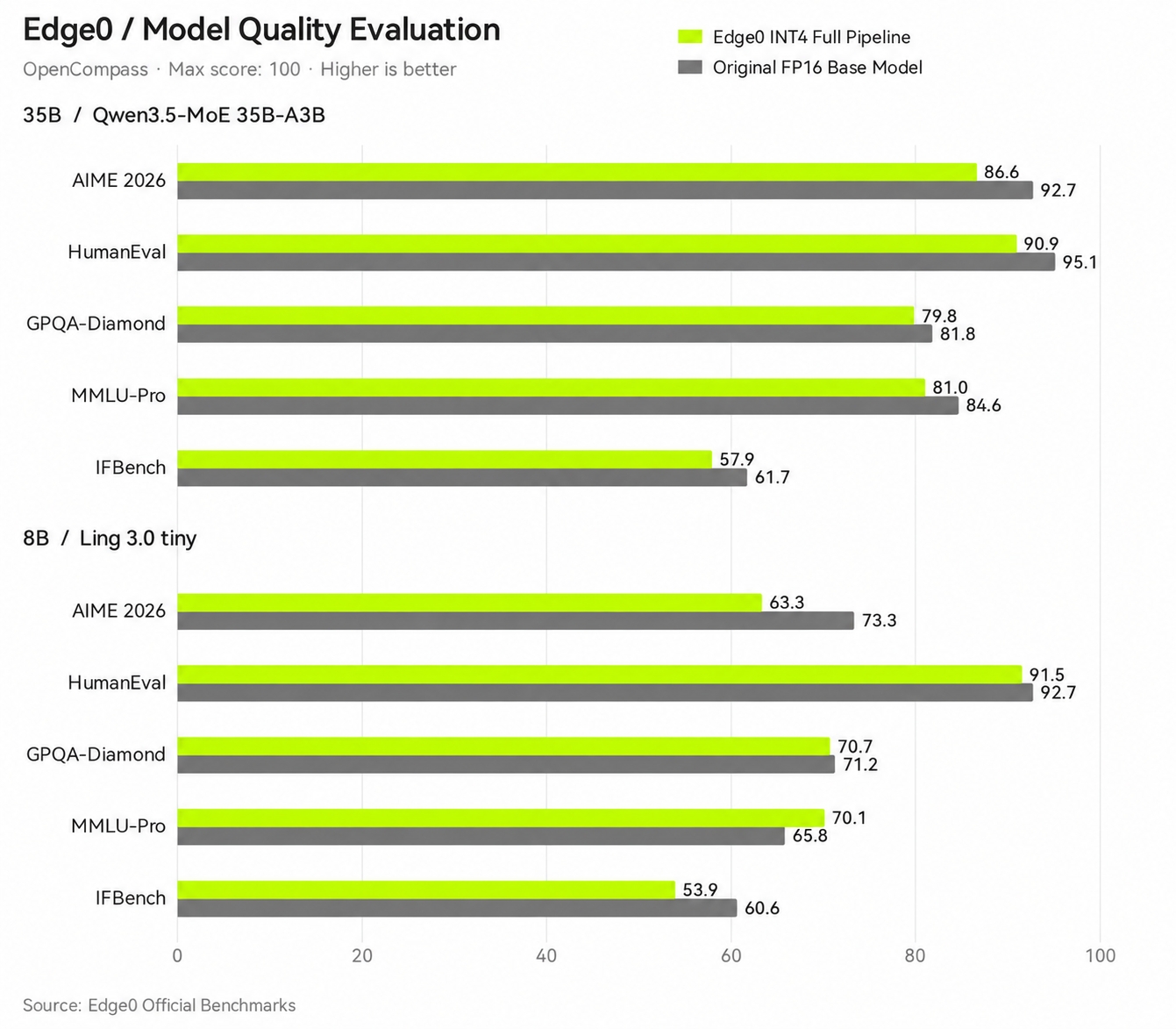
Edge0 publishes scores for five tests. For its 35B model, its average was 79.2 out of 100. The original base model scored 83.2 on the same set of tests, according to Edge0. That is evidence from the project team, not proof that every answer is correct.
A test score cannot tell you whether the model will correctly answer your own questions. Before using it for work, test it on examples you know the answers to. Check every answer that could affect money, safety, health, or a customer.
- Use the same questions for every model you compare.
- Check facts against a source you trust.
- Record wrong answers, waiting time, and memory use.
- Keep a person in charge of important decisions.
Who should try Edge0?
- Try Edge0 35B if you have a supported phone or computer, enough free storage, and want to experiment with a larger local model.
- Look at Edge0 120B or 145B only if you have supported hardware and are comfortable checking RAM, graphics memory, storage, and setup instructions.
- Choose Ollama or LM Studio first if you want a simpler way to run smaller local models.
- Do not buy hardware based only on a speed chart. Find a test using the same model file and a similar computer.
Check your device with the MamiLens calculator, then read the current Edge0 setup guide before downloading the model.
How to try it without wasting storage
Start from the current Edge0 project instructions. The project has changed its engines and model support over time, so old videos and commands may describe an earlier version.
Write down your device model, operating system, RAM, graphics memory, and free SSD or phone space. Check the download size and the temporary space needed for conversion. Start with a smaller model if you are unsure.
- Download Edge0 from its official project links.
- Check the model name and file size before you start.
- Keep extra free space for temporary files.
- Test a short, non-private question first.
- Watch the computer’s memory and temperature during the test.
Common questions
Can Edge0 35B run on a phone? Edge0 reports tests on an iPhone 17 Pro Max and an Android OnePlus phone. That does not mean every phone will work. Check the current app, model, and storage requirements for your device.
Does Edge0 35B need only 3 GB of storage? No. About 3 GB was a working-memory reading in particular tests. Edge0’s setup notes list about 18 GB for original weights and about 20 GB for converted files, plus temporary space during conversion.
Can Edge0 145B run with a 24 GB GPU? The project lists tests using 24 GB cards, but the system also uses RAM and SSD storage. Check the full memory figures and exact model file before you download.
Are the published speeds guaranteed? No. They are measurements on named devices with particular settings. Your result can be slower or faster.
Is Edge0 the same as Ollama? No. Edge0 is a special set of models and software made to use model parts from memory and storage. Ollama is a general local AI app that is often easier for beginners using smaller models.
Words you may see in this guide
- RAM
- The working memory used by your computer and apps.
- VRAM
- The memory on a dedicated graphics card. Shared graphics may use system RAM.
- Context
- The text and other input the model can use for its current answer.
- Quantization
- A way to make model weights smaller. It can change memory use and answer quality.
- Engine
- The software that loads the model and runs it.
- RAG
- A workflow that finds useful document passages before asking a model to answer.
- Benchmark
- A repeatable test. A result is useful only when you know the setup and task.
Official facts and real user evidence
Official documentation supports product and model facts. Community discussions show real setups, failures, and questions. A community result is supporting evidence, not a promise that another computer will perform the same way.
- Edge0 official project, versions, and supported devices ↗
- Official Edge0 145B and 120B model notes, memory figures, and benchmarks ↗
- Official Edge0 35B model tests, storage notes, and quality results ↗
- Edge0 35B research report on SSD streaming ↗
- Official Edge0 model architecture diagram ↗
- Official Edge0 quality chart and research notes ↗
- Community Edge0 145B test on RTX 4090, 64 GB RAM, and Windows ↗
- Edge0 issue report describing a long-context Apple Silicon failure ↗
Watch a real test. Check what fits your computer.
See practical local AI tests from DeviceTerra, then use MamiLens to build a hardware-aware shortlist for your own setup.
This guide is educational. Model software, licenses, and hardware support can change. Check official sources before an important deployment.