On this page
Give a picture a clear jobWhat it can read, and what it cannot knowPick the exact size before downloadingInstruct or Thinking: choose a clear first testInstall Ollama and reuse what is already therePrepare one clean image before asking anythingRun a real local image request on WindowsReceipt prompt: separate extraction from checkingScreenshot prompt: get help without sharing the whole desktopChart prompt: ask for labels before conclusionsKnow when a picture is the wrong inputFix common failures in the right orderDecide whether it is useful with a ten-image trialSourcesStart with Qwen3-VL 4B Instruct on a suitable 16 GB computer. Use one clear image, ask for visible facts first, and verify names, dates and totals. Bigger models do not fix a blurry picture.
Here is what matters, why it matters and how to check it on your own setup.
Give a picture a clear job
You have a receipt, a screenshot or a page with a useful chart. Copying its information by hand takes time. A vision model can help you turn that picture into text, a table or a short explanation you can check.
Qwen3-VL is worth testing for this kind of work. VL stands for vision and language. It can take an image together with your question, then produce a written answer. It is especially useful when the layout of a page matters, not just the words on it.
Start with a sample you understand. A receipt you can read yourself is a better first test than a badly photographed page from an unfamiliar document. You need a way to tell whether the model has helped or quietly changed a number.
In this guide you will choose an exact model, run one image test and use prompts that make mistakes easier to find. The aim is useful work you can verify, rather than an impressive demonstration with no clear success rule.
What it can read, and what it cannot know
A vision model receives the image you give it. That does not mean it sees your entire computer or can inspect hidden parts of a document. If a line is outside the screenshot, it cannot read that line. If a price is covered by a finger, it may guess unless you tell it not to.
OCR means turning visible writing in a picture into text. Qwen3-VL can help with OCR-like tasks, but asking it to explain a page is different from demanding an exact copy of every character. Choose the task before you ask for the answer.
It can describe a screenshot without controlling the app shown in that screenshot. Actual computer control requires separate tools and permission to act. Likewise, an image of a spreadsheet is not the underlying spreadsheet file, so hidden formulas and missing rows are unavailable.
The model may sound sure when it is wrong. Ask it to separate what it can read from what it is assuming. Treat unclear handwriting, tiny labels and important totals as reasons to inspect the original yourself.
Pick the exact size before downloading
Qwen3-VL is a family, not one download. Sizes include 2B, 4B and 8B, as well as larger options. An exact tag also identifies the response style. This guide uses 4B Instruct so the instructions refer to one reproducible model file.
For a suitable 16 GB computer, 4B Instruct is a practical starting point to assess. If you have 32 GB, you have more room to compare 8B at a short context. An 8 GB machine does not automatically pass our conservative plan for these profiles; use the calculator rather than assuming that a small download proves it fits.
The planning floors below are MamiLens estimates. They are not Qwen’s promised minimums, and the working memory can rise with image size, context and the engine. The actual file sizes come from the registry model files we checked.
Do not select a 30B model because its name includes A3B. That label describes the part active for a token; the full model still needs to be stored. For this first tutorial, keep the model small enough that a failed test is easy to retry.
A short context means keeping a modest amount of input and conversation in working memory. For this guide, 4K means about four thousand tokens, or pieces of input. It does not mean four thousand pages.
| Exact tag | Download | MamiLens RAM floor | A sensible trial |
|---|---|---|---|
| qwen3-vl:2b-instruct | About 1.94 GB | 11 GB | A lower-memory test on a suitable 12–16 GB system |
| qwen3-vl:4b-instruct | About 3.34 GB | 12 GB | Start here on a suitable 16 GB system |
| qwen3-vl:8b-instruct | About 6.20 GB | 17 GB | Compare on a suitable 32 GB system |
Instruct or Thinking: choose a clear first test
Instruct is the straightforward starting point for following a request such as extracting fields from a receipt. Thinking variants are separate downloads that can spend more time reasoning before giving an answer. They are not just the same file under a different name.
More time can help with some hard questions, but it can also make a simple task slower. If you want to copy a date from a clear receipt, a long explanation is usually less useful than a short, accurate field value.
Begin with Instruct. If the model reads the important text correctly but struggles to reason about it, compare a Thinking variant using the same image and question. Keep the result that improves the task enough to justify its waiting time.
Do not confuse the older Qwen3-VL family with Qwen3.8. Qwen3.8 can also accept images, but the checked 27B model file is much larger than the small VL models in this tutorial. A version number alone does not decide what fits your computer.
Install Ollama and reuse what is already there
Install Ollama from its official download page and open it. For the checked current 4B Instruct model file, use Ollama 0.30.0 or newer. The version requirement matters: an older engine can fail on a model even when your computer has enough memory.
Open PowerShell on Windows, or Terminal on macOS or Linux. Check your version, then list installed models. If qwen3-vl:4b-instruct is already in that list, reuse it. A different tag, such as a Thinking version, does not count as the same model file.
Pull the model if you do not already have it. Keep enough free space on the engine’s model drive and wait for the success message. Your browser’s download folder is not necessarily where Ollama stores model weights.
You do not need a cloud API key for the local REST example below. Ollama must be running on your own computer. If the local service is not available, open Ollama before repeating the request.
Check, inspect and download
ollama --version
ollama list
ollama pull qwen3-vl:4b-instructPrepare one clean image before asking anything
Save a harmless image on your computer as sample-receipt.png. The filename is just an example; use a file you actually have. You can create a sample receipt in a document editor and take a screenshot, or use a receipt with private details covered before saving.
Make sure the important text is large enough to read. Crop away unused borders, rotate the page upright and avoid glare. If a page is long, two readable pictures can be more useful than one very tall picture with tiny writing.
For your first test, do not include a bank statement, student record or customer identity document. Learn how your tools handle images with a public or invented sample first. After that, decide which real files your approved local workflow may handle.
Keep the original image open while reviewing the result. You want to compare each important field with what is visible. Never use the model’s own explanation as the only evidence that its extracted number is correct.
You can also open the official sample receipt pictured in the next section at full size, then save it as sample-receipt.png. This gives you a public example for the image request before using one of your own files.
- Use one page or screenshot with a clear purpose.
- Keep totals, dates and column headings visible.
- Cover sensitive details in the saved file itself, not only in a preview.
- Keep a copy of the original for checking.
Run a real local image request on Windows
Place your sample image in the current PowerShell folder, or replace the path in the first line with its full path. Paste the block below after the model download has finished. It reads the image and prepares it for the local Ollama chat API.
Base64 is simply a way to package the image bytes into text that the API can accept. You do not need to understand or edit that text. The script handles it for you. The request goes to your own computer at 127.0.0.1 and explicitly requests a 4K context.
The answer appears after the complete response is ready. On the first run, model loading and image processing can take extra time. Keep an eye on memory and responsiveness while waiting. If the request fails, read the error before downloading a second copy of the model.
A correct result should list visible fields and use “unreadable” where the image is unclear. Compare each value with the image. If your sample is not a receipt, change the content line to ask for the visible information in that picture.
Windows PowerShell: send one local image
$imagePath = (Resolve-Path ".\sample-receipt.png").Path
$imageBytes = [System.IO.File]::ReadAllBytes($imagePath)
$imageBase64 = [Convert]::ToBase64String($imageBytes)
$body = @{
  model = "qwen3-vl:4b-instruct"
  messages = @(@{
    role = "user"
    content = "Read this sample receipt. List the shop, date, items, currency and total. Use unreadable for unclear fields. Do not guess."
    images = @($imageBase64)
  })
  stream = $false
  options = @{ num_ctx = 4096 }
} | ConvertTo-Json -Depth 6
$result = Invoke-RestMethod -Uri "http://127.0.0.1:11434/api/chat" -Method Post -ContentType "application/json" -Body $body
$result.message.contentReceipt prompt: separate extraction from checking
For receipts, ask for a fixed set of fields. A useful prompt is: “Read the visible receipt. Return shop, date, currency, item names, quantities, line totals and printed total. Keep the original spelling. Write unreadable for unclear text. Do not calculate missing values.”
That first pass should copy information, not improve it. A model can accidentally turn a faint 8 into a 3, drop a decimal point or invent a currency. Those small changes can make the result useless for expenses or stock records.
After checking the extracted fields, ask a second question: “Using only the verified values below, check whether the line totals agree with the printed total. Show the calculation and list any mismatch.” Give it your checked values rather than silently accepting the first image reading.
A receipt may include discounts, tax or a payment amount that differs from the sale total. Do not assume the largest number is the total you need. Name the field precisely and review the original layout. For real accounting work, keep a human approval step.
For a quick manual check on the pictured sample, its printed Net Total is RM78.75. The receipt also shows a rounding adjustment. That is a visible reading of the example, not an answer we obtained from a local model. Check that the model reports the requested field rather than another nearby amount.

A correct calculation cannot fix a misread price. Verify the extracted values before asking the model to calculate anything.
Screenshot prompt: get help without sharing the whole desktop
A screenshot is useful when an error message is hard to copy. Crop to the relevant window, keep the title and full error visible, and remove unrelated account names or notifications. A clean image gives the model less irrelevant material to interpret.
Try: “Transcribe the visible error exactly. Explain it in simple language. Suggest three checks that do not delete files or change security settings. Ask for missing details instead of assuming them.” This produces a response you can review before making changes.
Check the transcription first. If one word in an error code is wrong, the explanation can point you in the wrong direction. Ask a follow-up question about the exact code after confirming it yourself.
Treat every proposed command as advice to inspect. Reading a screenshot does not grant the model permission to act on your computer. For an important device, make backups and use official product instructions before changing anything. You remain in control of the next step.
Chart prompt: ask for labels before conclusions
A chart can look clear while hiding the detail needed to interpret it. The line may show percentages rather than totals. A short date range may make a small movement look dramatic. A cropped axis can change the apparent size of a difference.
Ask: “Identify the chart title, axes, units and date range. List the visible values or say unreadable. Then describe the trend in three sentences. Separate visible facts from possible explanations.” This encourages the model to show the basis for its answer.
Do not ask it to invent exact values from a line that has no labels. A careful answer may provide an approximate range or explain why a precise number cannot be read. That can be more useful than a neat table of invented figures.
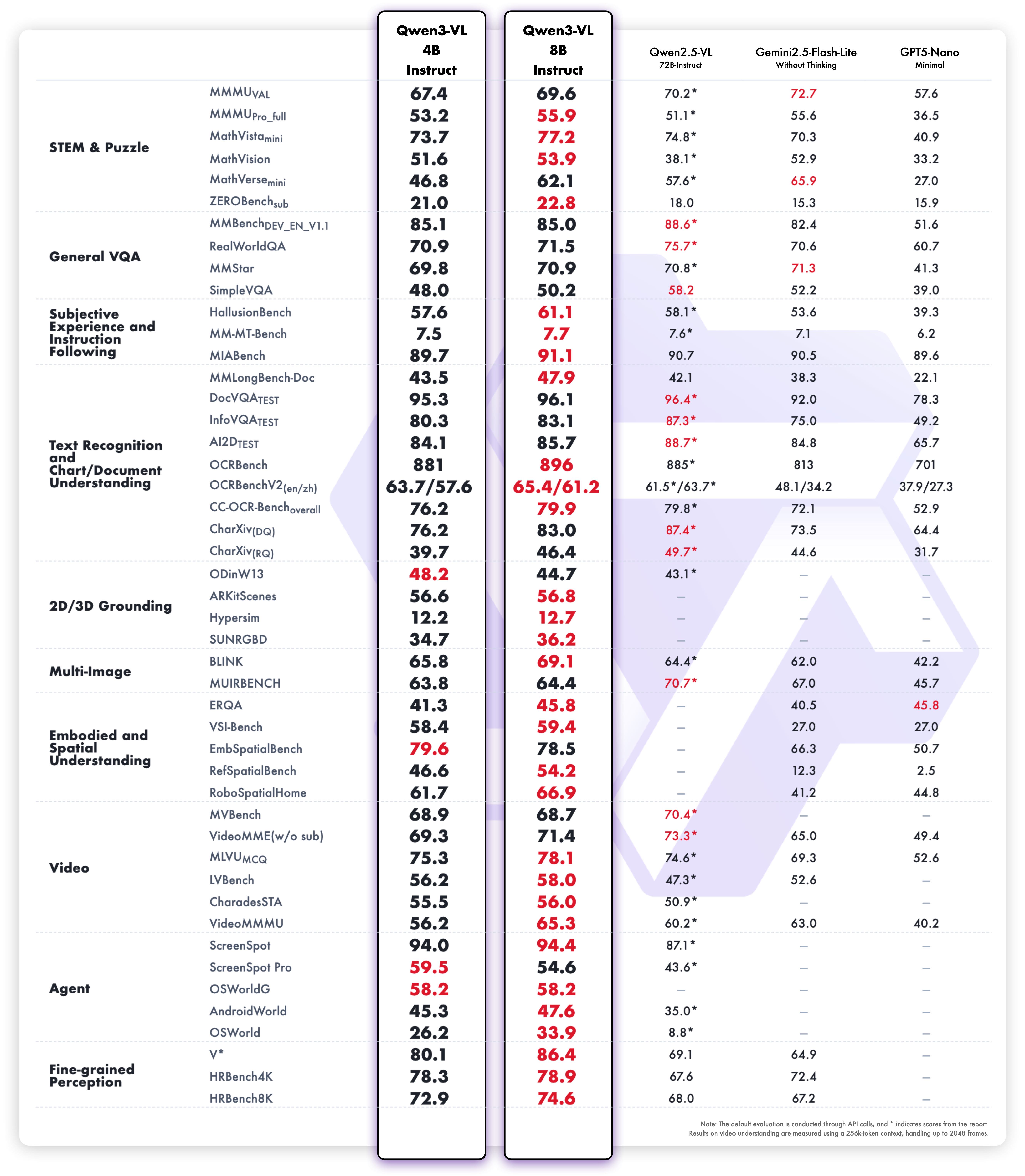
The official Qwen3-VL chart below is an example of why labels matter. It reports particular model variants and tests. It is not a Qwen3.8 result and it does not measure how fast your computer will respond.
DocVQA is a prepared test of questions about documents. In the publisher’s displayed comparison, 4B Instruct scores 95.3 and 8B Instruct scores 96.1 on that row. Those scores do not mean either model will read that percentage of your receipts correctly. Your files, model file and settings can be different.
| Test row | Qwen3-VL 4B Instruct | Qwen3-VL 8B Instruct | How to use it |
|---|---|---|---|
| Document questions (DocVQA) | 95.3 | 96.1 | A reason to test both on your documents, not a promised receipt accuracy. |
Know when a picture is the wrong input
A screenshot of a ten-page document is a poor replacement for the document itself. If the PDF already contains selectable text, extracting that text may be simpler and more accurate than asking a vision model to read every page as a picture.
Use vision when visual layout matters: tables, diagrams, scanned pages or a screenshot of an app. Use a document-search workflow when you need answers across a large set of text files. A vision model on its own does not build a complete searchable library.
For multiple pages, keep a page number with every image. Ask for one page at a time while learning. If you later combine results, check whether the same person, invoice number or heading was confused across pages.
Complex handwriting, medical images and important legal or financial judgments need appropriate expert review. A model that correctly reads a restaurant receipt has not thereby proved it can interpret every kind of image.
Fix common failures in the right order
If you see a connection error, check whether Ollama is running before changing the model. If you see a model-not-found error, compare the exact tag with ollama list. If the error says the engine is too old, update the engine rather than repeatedly downloading the same weights.
If the image path fails, confirm the file exists and that PowerShell is using the folder you expect. A renamed file or wrong extension is a file problem, not a model problem. The Resolve-Path line in the example is meant to make that failure visible early.
If the answer is wrong, improve the picture and narrow the question before moving to a larger model. Try a crop with larger text, then check whether the same field is still misread. Change one thing at a time so you can tell what helped.
If the computer becomes slow or memory fills up, reduce context, use one image and test a smaller profile. Upscaling the same blurry image cannot recover details that were never captured. A clearer original is often a better upgrade than more parameters.
Inspect available and currently loaded models
ollama list
ollama psDecide whether it is useful with a ten-image trial
Collect ten harmless images that resemble your real work: a clear receipt, a screenshot, a chart and a few harder examples. Write the expected fields or answer for each one before testing. Include at least one image with an unreadable value.
Score the fields, not the confidence of the explanation. Count wrong digits, missing rows and invented details. Note the waiting time and how much correction you had to do. A model that saves two minutes but creates five minutes of checking is not saving time.
Try a larger model only on the cases that matter and still fail. Use the same files and prompts. If 8B improves the hard cases enough, keep it for that workflow. If 4B already passes, the smaller download may be easier to live with.
Keep those test files and notes. Run them again after changing the model, engine or image settings. You will have a small, useful quality check for your own work instead of relying on someone else’s best demonstration.
Words you may see in this guide
- RAM
- The working memory used by your computer and apps.
- VRAM
- The memory on a dedicated graphics card. Shared graphics may use system RAM.
- Context
- The text and other input the model can use for its current answer.
- Quantization
- A way to make model weights smaller. It can change memory use and answer quality.
- Engine
- The software that loads the model and runs it.
- RAG
- A workflow that finds useful document passages before asking a model to answer.
- Benchmark
- A repeatable test. A result is useful only when you know the setup and task.
Official facts and real user evidence
Official documentation supports product and model facts. Community discussions show real setups, failures, and questions. A community result is supporting evidence, not a promise that another computer will perform the same way.
- Qwen3-VL official model card ↗
- Qwen3-VL 8B model card and original benchmark visuals ↗
- Exact Qwen3-VL tags and download sizes ↗
- Qwen official computer-use cookbook ↗
- Qwen official OCR cookbook ↗
- Ollama image input ↗
- Ollama local API and authentication ↗
- Ollama context length and memory ↗
- Ollama CLI: download, list, stop and remove ↗
- Ollama chat API ↗
- Ollama local operation and privacy ↗
Watch a real test. Check what fits your computer.
See practical local AI tests from DeviceTerra, then use MamiLens to build a hardware-aware shortlist for your own setup.
This guide is educational. Model software, licenses, and hardware support can change. Check official sources before an important deployment.