On this page
Avoid the most expensive kind of free downloadThe names can hide the decision you need to makeUse this decision table before browsing a leaderboardCompare real file sizes, not just the B labelChoose by what goes into the modelRead benchmark pictures without being misledUse one fair test instead of five changing demonstrationsScore what matters, including your correction timeKeep the engine and the artifact togetherTreat speed problems as a checklistClean up unused models after you make a decisionCheck privacy as a workflow, not a badgeA clear choice for three everyday situationsSourcesBoth families can work with images. Choose by the exact model file, your task, available memory and a short test. Qwen3.8-27B is much larger than Qwen3-VL 4B, so newer does not automatically mean the right download.
Here is what matters, why it matters and how to check it on your own setup.
Avoid the most expensive kind of free download
A model can be free to download and still cost you an afternoon. You wait for the files, struggle to load them, change settings you do not understand and end up keeping several models you never use.
You can avoid much of that by making three decisions before downloading: what job the model should do, what your computer can safely hold, and how you will recognize a useful result. The family name comes after those decisions, not before them.
Qwen3.8-27B and Qwen3-VL overlap in important ways. Both can take images through supported software. The most obvious difference for many local users is the size of the exact model being considered, alongside its task focus and engine requirements.
This comparison is a decision guide. It is not a claim that one family beats the other on every task. We have not run a head-to-head device benchmark here. You will get a clear way to make that comparison using your own work.
The names can hide the decision you need to make
Qwen3.8-27B refers to a specific newer 27B model. Qwen3-VL refers to a family with several sizes and separate Instruct and Thinking variants. Comparing “3.8” with “VL” without naming the size leaves out information you need to plan a download.
A 4B Instruct model and a 27B model are not equivalent choices for a laptop. The larger model has a much bigger model file. It also needs working memory for the engine, your conversation and any images. You cannot infer that budget from the version number alone.
VL means vision and language, but it does not mean only VL-labelled models accept pictures. Qwen3.8 is also a vision and language model. Choose it for the complete mix of tasks you need to assess, rather than assuming image work automatically excludes it.
Write down the full tag before you compare. In this guide, the main examples are qwen3.8:27b, qwen3-vl:4b-instruct and qwen3-vl:8b-instruct. That gives you a comparison you can repeat later.
Use this decision table before browsing a leaderboard
For a first local setup, the table below is more useful than a general claim about which model is smartest. It connects a possible choice with a job and a limit you can actually check.
The RAM examples describe sensible starting points for assessment, not guaranteed minimums. A 16 GB system with many heavy apps open has less working room than an otherwise idle 16 GB system. A GPU can change the memory split only when its GPU software support is supported.
If your computer is outside these examples, use MamiLens with your exact memory and task. When the calculator does not produce a safe recommendation, shorten the context or choose a lighter profile. Do not treat the absence of a recommendation as an invitation to guess.
You can still read about a large model without installing it. Learning what a model is good at and deciding that it is too large for your current machine is a useful outcome.
| Your situation | First model to assess | Why this is a useful first step |
|---|---|---|
| 16 GB RAM; receipts and screenshots | Qwen3-VL 4B Instruct | Much smaller download; start with one image and 4K context |
| 32 GB RAM; compare image answers | Qwen3-VL 8B Instruct | More room for a controlled comparison with 4B |
| 48–64 GB RAM; mixed writing, code and images | Qwen3.8-27B if the full plan fits | A larger model worth testing on harder mixed work |
| 8 GB RAM or uncertain hardware | Check the calculator before selecting a vision model | These profiles may not pass a conservative memory plan |
| A working smaller model already meets your needs | Keep it and test only its important failures | An upgrade should solve a real problem |
Compare real file sizes, not just the B label
The checked Qwen3.8-27B model file is about 17.75 GB. Qwen3-VL 4B Instruct is about 3.34 GB, and 8B Instruct is about 6.20 GB. Those differences affect your download time and storage before you even send a prompt.
They are not the complete RAM requirements. A model file may be compressed in a format designed for local use. When the engine works, it still needs additional space for the input, response and its own work. Bigger pictures and longer conversations can increase that space.
Quantization is the term for storing model numbers in a smaller form. If you compare two different files, record this setting too. A published test on an original model weights is not automatically a measured result for the smaller file you downloaded.
MamiLens lists a 34 GB planning floor for the checked Qwen3.8 profile, 12 GB for the 4B VL profile and 17 GB for the 8B VL profile. The task and context plan may require more. Use these as planning information, then measure your actual setup.
| Profile | Artifact | MamiLens RAM floor | Engine version note |
|---|---|---|---|
| Qwen3.8-27B | 17.75 GB | 34 GB | Ollama 0.32.12+ |
| Qwen3-VL 4B Instruct | 3.34 GB | 12 GB | Ollama 0.30.0+ for this model file |
| Qwen3-VL 8B Instruct | 6.20 GB | 17 GB | Ollama 0.30.0+ for this model file |
Choose by what goes into the model
For mostly short text, first ask whether you need a vision model at all. If your work is rewriting messages or summarizing copied notes, a smaller text-only model you already use may be enough. Image support is not valuable when you never use it.
For receipts, app screenshots and charts, a smaller Qwen3-VL model is a useful first trial. It lets you assess the image task without beginning with the largest download. Keep the images clear and the requests specific.
For mixed work that combines writing, coding, images and longer multi-step tasks, Qwen3.8-27B is worth assessing when the full hardware plan fits. Its official card emphasizes those broader capabilities. That is a reason to test it, not a reason to skip checking the answers.
For many PDFs or a company knowledge base, the model is only one part of the system. You may also need text extraction, document search, citations and access rules. Neither family turns a folder of files into a reliable business assistant by itself.

Read benchmark pictures without being misled
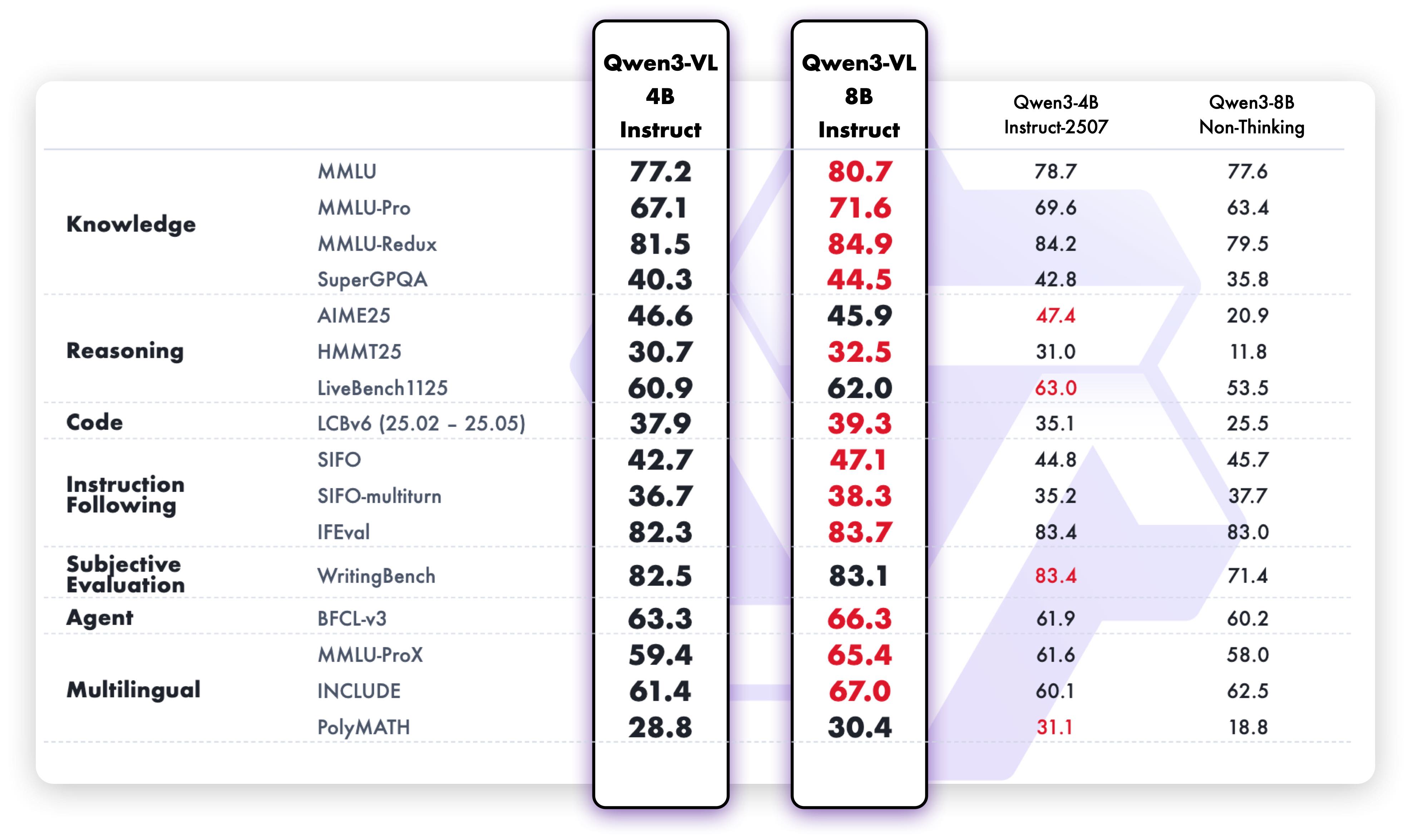
A benchmark image has a story behind it: which exact model was used, which questions were asked, which tools were available and how answers were scored. The headline bars rarely contain all of that detail.
The Qwen3-VL chart reproduced below reports the models named in that chart. It is useful evidence about those variants. It is not a direct test against Qwen3.8, and it should not be relabelled as a result from your laptop or a different downloaded file.
Different official cards can use different test versions and settings. Even a familiar benchmark name may have changed examples, tools or scoring details. Before comparing two numbers from separate pages, read both sets of notes and look for a genuinely matched test.
For your decision, look for evidence relevant to the work you do. A chart-reading score can help you decide to try a vision model. It cannot prove that the model will copy every field from your own receipts or run quickly on your particular GPU.
Use one fair test instead of five changing demonstrations
Choose a small set of tasks before you install another model. If your main job is image reading, use ten images: several normal cases, a few difficult cases and at least one with missing or unreadable information. Write down the correct answer where you can.
If you also care about text work, add ten text prompts. Include a rewrite with facts that must stay unchanged, a short summary, a small code question and a request where the model should ask for more information. Use samples you are allowed to share with your chosen local tools.
Keep the prompt, image, answer length and context plan the same across models where their interfaces support it. Do not give one model a clearer image or extra hints and call the result a fair comparison.
Allow a separate warm-up request. Loading a model adds time and can make the first answer unusually slow. Record loading separately from the later tasks. If a test fails because the model cannot load safely, record that failure rather than silently changing the hardware plan.
- Save every test prompt and input file.
- Write the expected facts or success rule before testing.
- Record the exact tag, engine version, context and file type.
- Keep the failed answers as well as the good ones.
- Change only one setting when investigating a problem.
Score what matters, including your correction time
Give each answer a simple score: zero for wrong or unusable, one for partly useful but needing correction, and two for correct and usable. With twenty tasks, the largest possible score is forty. This is your own work score, not a public benchmark.
Also record critical mistakes separately. Inventing a payment amount or changing a customer promise can matter more than several good rewrites. A model should not win a business workflow by averaging away an error you cannot accept.
Measure your editing time. Suppose one model responds faster but you must check and repair several fields. Another may take longer to answer but leave less work afterward. The useful comparison is the time to a checked result, not only the time to the first words.
If both models pass, prefer the one that is easier to run reliably within your space and memory budget. If only the larger model passes an important hard task, keep it for that job rather than forcing it into every small request.
| Task | Model A score 0–2 | Model B score 0–2 | Critical error? | Time to checked result |
|---|---|---|---|---|
| Clear receipt | Record score | Record score | Wrong total / None | Record your total time |
| Blurry label | Record score | Record score | Guessed unreadable text? | Record your total time |
| Customer message | Record score | Record score | Changed a promised fact? | Record your total time |
Call the result a test on your computer with your prompts. Do not turn it into a general claim that one model is best for everyone.
Keep the engine and the artifact together
An Ollama tag identifies a model that Ollama knows how to download and load. It is not a file you can paste into LM Studio’s model search and assume will load unchanged. The other app needs a compatible model file and support for the model’s architecture.
For the exact profiles covered here, the checked download route is Ollama. Other engines may support the models, but you should use their own verified files and current setup instructions. A model being available somewhere does not prove every app supports every feature.
Check the engine version before blaming memory. If the model file requires a newer engine, repeated downloads will not fix the problem. Update the engine, confirm the tag and try a short test again.
For a team or a service with many simultaneous users, a desktop setup is only a starting experiment. You need to assess several users at once, access control, reliability and the exact serving engine. One successful chat does not establish that a service is ready for a business.
Record your current setup
ollama --version
ollama list
ollama psTreat speed problems as a checklist
Start with the simple questions. Is the model still loading? Is another large model already using memory? Is your context set much higher than the test needs? Are you sending a huge image for a question about one small part of it?
Then check the engine’s current model listing and memory behavior. Ollama ps can show loaded models and their CPU/GPU split. If the setup is using system RAM and CPU, do not report its waiting time as a full-GPU result.
A smaller model may be the best fix when the computer becomes unresponsive. Shorter context, a clearer crop and fewer active apps can also help. Change one item and repeat the same test so you know whether the change improved the result.
Do not disable security settings or install random drivers because a social media post promises more speed. Use the official engine and hardware instructions. If a particular GPU path is uncertain, a clearly labelled CPU test is more useful than an unsupported claim of acceleration.
Clean up unused models after you make a decision
Before removing anything, run ollama list and copy the exact tag of the model you want to delete. Make sure it is not the one you decided to keep. If an app depends on it, update that app’s selection first.
Stopping a model and deleting a model are different actions. Stop unloads a running model from memory. Remove deletes the selected model from the engine’s library. You may need to download it again if you change your mind later.
The example below removes only the named 4B Instruct entry. Use it only if that is the model you deliberately chose to remove. Do not run cleanup commands merely because they appear in a tutorial, and do not manually delete random files inside the engine’s shared model store.
Some model layers may be shared. Listed model size is not a guarantee of the space a deletion will recover. Refresh your library and check free storage afterward. A small collection of models with clear jobs is easier to manage than a growing collection of experiments.
Inspect and unload without deleting
ollama list
ollama stop qwen3-vl:4b-instruct
Only if you deliberately want to delete this exact model
ollama rm qwen3-vl:4b-instructCheck privacy as a workflow, not a badge
After downloading, a local model can answer without contacting a hosted model service. That can be valuable where internet access is unreliable or documents should stay on a computer you control. It still depends on the surrounding app and its settings.
An app can send data to web search, a cloud connector, a remote image service or another tool even when one part uses local AI. Review those connections. Use a harmless example for an offline test and confirm the selected model is the local one.
Decide who may use the computer and see its saved chats. Local processing does not hide a file from another person with access to that account. Backups, shared folders and exported results also need attention.
For a school or small business, begin with a narrow approved task. Write down which files are allowed, who checks the output and what is kept. Expand after that workflow works reliably. Model choice is useful, but the rules around the work are what make it dependable.
A clear choice for three everyday situations
If you have a suitable 16 GB laptop and mostly want to read screenshots, start by assessing Qwen3-VL 4B Instruct. Use one clear image and a short context. Keep it if it saves time after checking. Move up only when a specific failure justifies the extra memory.
If you have 32 GB and image reading is central to your work, compare the 4B and 8B Instruct profiles using the same ten images. You may find that 8B is worth keeping for harder cases, or that 4B already handles the work you actually do.
If you have a well-equipped machine and need stronger mixed text, coding and image work, test Qwen3.8-27B against your current model. Confirm the complete hardware plan first, including context and any checked use of GPU and system RAM. Use the same task sheet rather than assuming the newer model must win.
In every case, choose one next action: check the hardware, run the small test, or keep the model that already works. That is enough progress. You do not need to download every model to make a sound decision.
Words you may see in this guide
- RAM
- The working memory used by your computer and apps.
- VRAM
- The memory on a dedicated graphics card. Shared graphics may use system RAM.
- Context
- The text and other input the model can use for its current answer.
- Quantization
- A way to make model weights smaller. It can change memory use and answer quality.
- Engine
- The software that loads the model and runs it.
- RAG
- A workflow that finds useful document passages before asking a model to answer.
- Benchmark
- A repeatable test. A result is useful only when you know the setup and task.
Official facts and real user evidence
Official documentation supports product and model facts. Community discussions show real setups, failures, and questions. A community result is supporting evidence, not a promise that another computer will perform the same way.
- Qwen3.8-27B official model card, license and benchmark notes ↗
- Exact local Qwen3.8 artifact ↗
- Qwen3-VL official model card ↗
- Qwen3-VL 8B model card and original benchmark visuals ↗
- Exact Qwen3-VL tags and download sizes ↗
- Ollama local API and authentication ↗
- Ollama context length and memory ↗
- Ollama CLI: download, list, stop and remove ↗
- Ollama chat API ↗
- Ollama local operation and privacy ↗
Watch a real test. Check what fits your computer.
See practical local AI tests from DeviceTerra, then use MamiLens to build a hardware-aware shortlist for your own setup.
This guide is educational. Model software, licenses, and hardware support can change. Check official sources before an important deployment.